Password Policy
Access Management Password policy define the rules to enforce a strong password policy.
Recommendation
Disable these settings if synchronising passwords from a directory where a password policy is already in effect.
Password Policy Settings
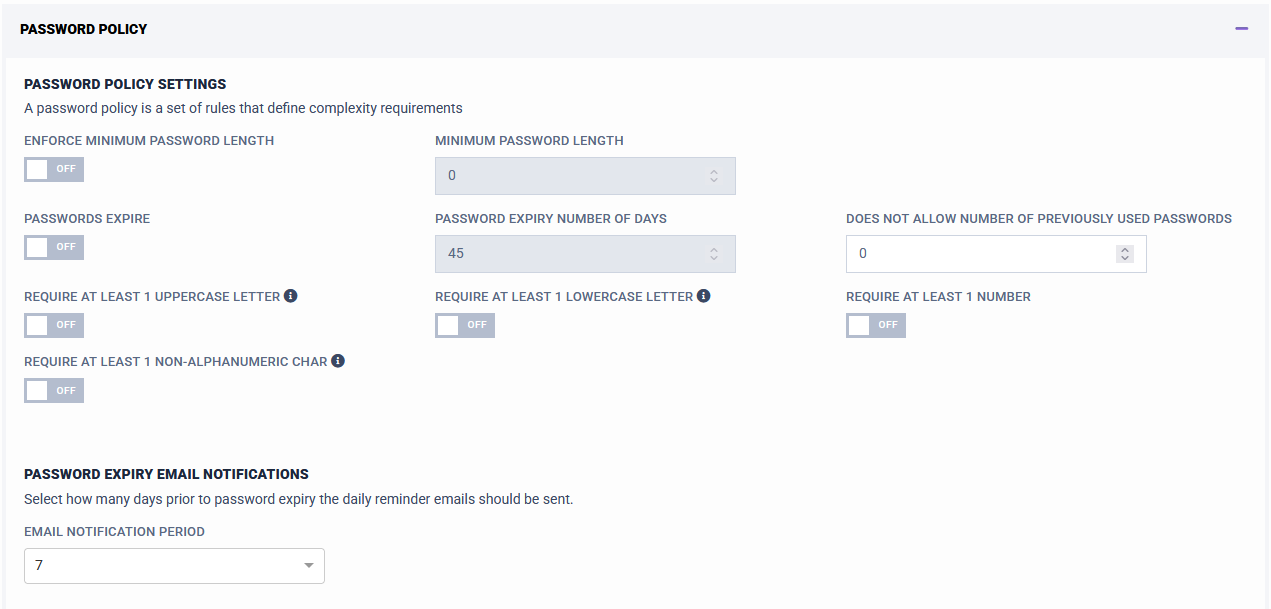
- Enforce Minimum Password Length: Enable/Disable the minimum password length feature.
- Minimum Password Length: Sets the minimum length of passwords.
- Passwords Expire: When enabled, uses the 'Password Expiry Number of Days' setting, and forces users to change passwords.
- Password Expiry Number Of Days: The number of days after which passwords will expire. Only active if 'Passwords Expire' is enabled.
- Does not allow number of previously used passwords: Enforces the password history.
- Require at least 1 uppercase letter: Enable/Disable to enforce uppercase characters.
- Require at least 1 lowercase letter.
- Require at least 1 number: Enable/Disable to enforce password numbers.
- Require at least 1 non-alphanumeric char: Enable/Disable to enforce non-alphanumeric characters.