Reporting
The reporting feature allows capturing reports such as authentication types and user management. These can be run ad hoc or set to run on a schedule with the results sent via email.
Embedded Reports
Allows reports to be run on user: authentication types, applications and enrolment status. These are predefined reports that are available to download in four formats: Excel, PDF, CSV and Copy.
Available reports:
- Authenticator Enrolment: Lists enrolled users and their authentication type.
- Not Enrolled by Authenticator: Lists users that are in the system but haven't been assigned an authentication type.
- Logins by Authenticator: Lists each method of authentication type by the number of logons.
- Logins By Application: Lists each application by number of logons.
- Not Enroled Users: Lists users that are in the system but haven't been enroled.
- Users With Temporary Authenticators: Lists users that have been assigned a temporary authentication type.

Automated Reports
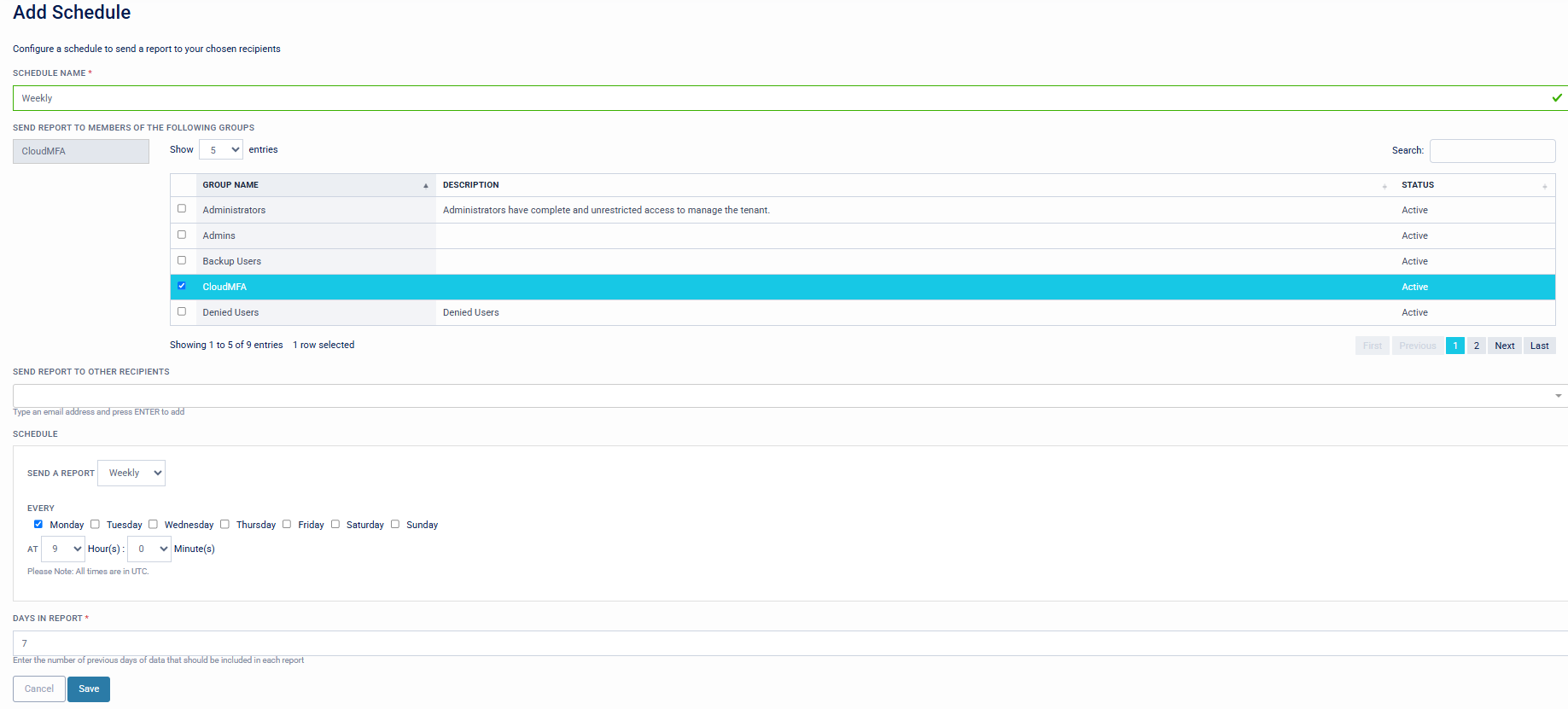
The ability to customise and schedule automated reports.
Schedule options:
- Schedule name.
- Send reports to a group of users.
- Include additional recipients.
- Choice to send a report Weekly, Monthly, or Yearly.
- Time at which the report is to be sent.
- Number of days to be included in the report (for example, 7 days on a weekly report would avoid overlapping reported data).